Book a tour
Pick an open time on a listing, in person or by video call, and manage it from your dashboard.
Book a time
- Step 1Open the home and select Schedule tour.
- Step 2Choose the kind of tour: In person or Video call, when the landlord offers both.
- Step 3Pick a day and a time. Times are in the property's local time.
- Step 4Enter your name and email. A phone number and a note are optional.
- Step 5Select the Book button with your time.
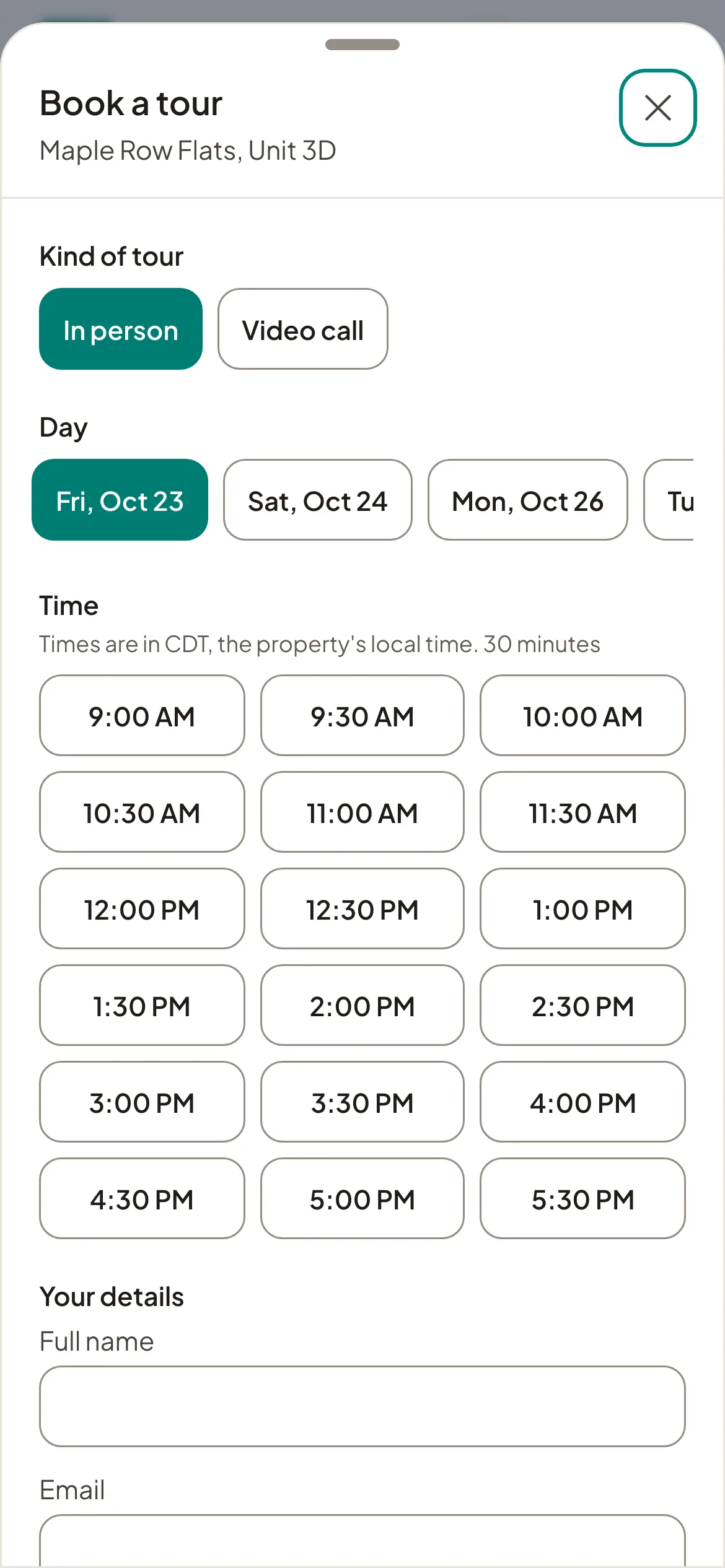
You do not need an account to book. Some landlords confirm tours straight away and you see Tour booked. Others confirm each request; you see Tour requested and get an email when they answer.
Note: If a landlord has not set tour hours online, the tour window says Tours are arranged with the leasing office, with buttons to email or call the office. Use either to arrange a time.
Change or cancel
Signed in, open Tours. Select Reschedule to move your tour to another open time, or Cancel to cancel it. The landlord is told either way. For a confirmed video tour, Join the video tour appears here.
Booked without an account? Use the link in your tour email to see it, or select Cancel tour there. Tours you booked with an email also appear in your dashboard when you sign in with an account that uses that email.
Virtual tours
Some listings have a Virtual tour you can open any time, hosted by Matterport, YouTube, Vimeo, Kuula or CloudPano. No booking needed.